


-
Check the CRN
The first step to registration problem solving is to read the CRN.
Check the " CRN" of the course.
The CRN will tell you if you need to take a lab with the course, get departmental approval, or if there are any other requirements for taking the course.
-
Do I need a lab?
Does the course you are trying to register for require a lecture and a lab section? If so, to successfully register, you must register for both the course and the lab at the same time.
First, click the CRN.
This will take you the CRN page. The page will tell you if the course requires a lab, and what labs you may choose from.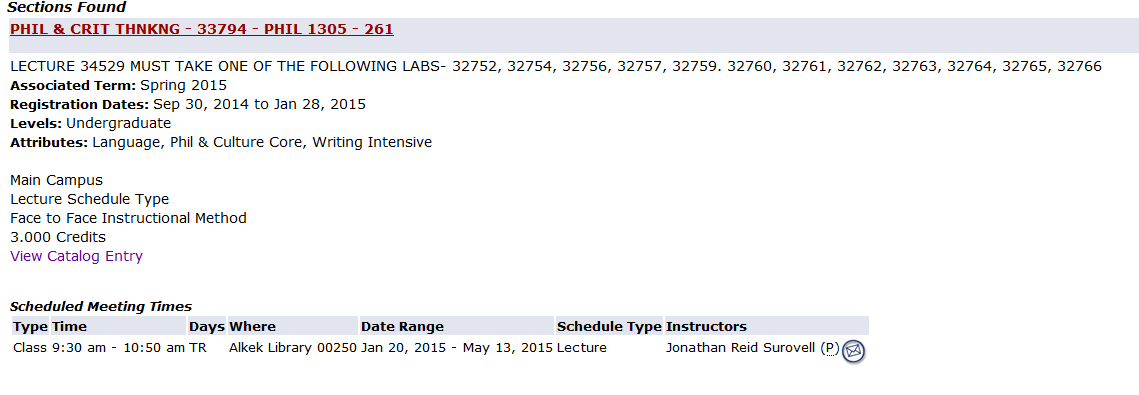
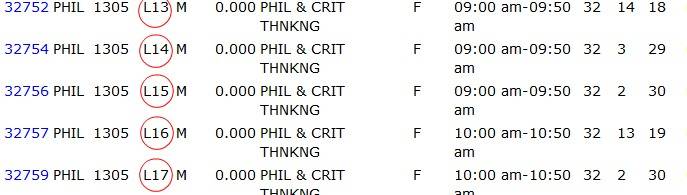
Also, lab sections are labeled for your benefit. Make sure the lab you register for does not conflict with another class.
Get a Feel for the Course
Do you want to know more about your course? Wondering about the workload? Wish you could get a better understanding on teaching style and course organization?
Use HB 2504
HB 2504 provides previous course syllabi, professor's vita, and Student Perception Inquires (SPI). This is a useful tool to see what the course workload will be like.
Also, the Student Perception sections contain responses from fellow Bobcats like you.
How to Add a Class
Please go to this page on the Registrar's site to view a video with instructions on how to use Banner to register for classes, as well as a visual step-by-step list of how to do the same.